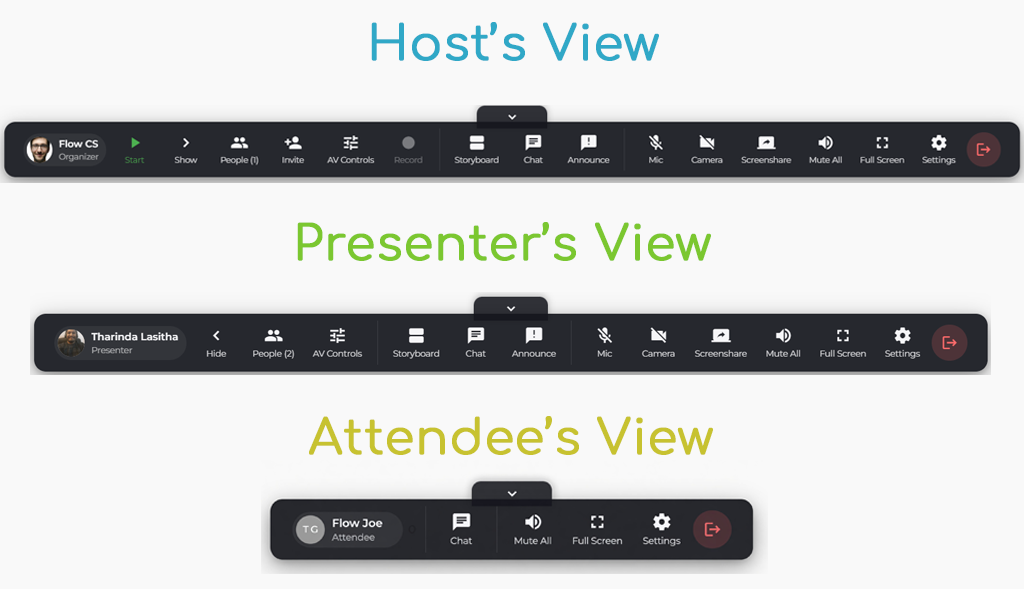
“The Flow Toolbar is about putting the power of a broadcast studio into a browser window. It’s cleaner, faster, and built for high-stakes webinars.”
First Look (Video)
We Made Things Easier for You!
Managing a live webinar can feel like juggling. You’re switching between slides, chat, polls, and video feeds, all while trying to engage your audience. At Flow Webinars, we believe your focus should be on your content, not your cursor.
That’s why today, we are officially launching the Flow Toolbar: The Live Event Management Station. This is the PHASE 1 of the NEW LAYOUT that we are rolling out.
By centralizing every essential production tool into one intuitive, streamlined interface, we’ve eliminated the clutter that slows you down. Whether you’re a solo presenter or a professional production team, this update is designed to make your live events smoother, faster, and more professional.
From Scattered to Synchronized
Previously, managing a webinar meant navigating across different tabs and menus. If you needed to launch a poll while screen-sharing, it often required multiple clicks. These micro-delays add up, breaking the flow of your presentation and distracting your viewers.
The Flow Toolbar solves this by acting as a single “Managing Station.” All your core features are now docked in a single, persistent location, giving you instant access to:
- Media Controls: Switch between your Smart Storyboard blocks with one click.
- Engagement Suite: Launch polls, Q&A, and handouts instantly.
- Presenter Tools: Manage audio, video, and screen-sharing permissions without leaving the main view.
- Attendee Insights: Keep an eye on engagement scores and attendee questions in real-time.
Why the New Layout Wins
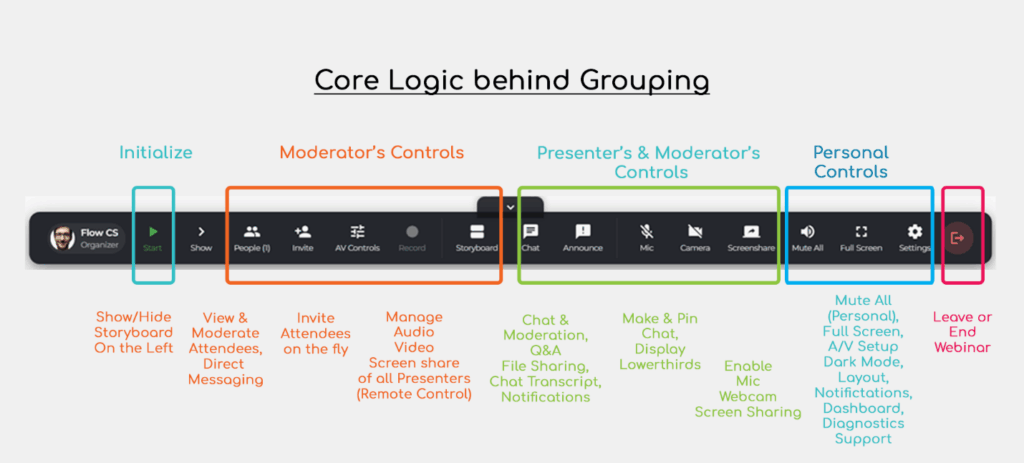
We didn’t just move buttons around; we redesigned the workflow based on how you actually run events. Here’s why the new Toolbar is a game-changer for your marketing and production teams:
- Reduced Cognitive Load
When your tools are scattered, your brain spends energy searching for the right button. With the Managing Station, your tools are exactly where you expect them to be. This allows you to stay “in the zone” and maintain better eye contact with your camera. - Faster Transitions
Using our signature Smart Storyboards, you can now queue your next content block and trigger it with a single tap on the toolbar. No more awkward pauses while you fumble through a sidebar menu. - Professional “Backstage” Feel
For producers, the new layout provides a clearer view of the “Stage” vs. the “Backstage.” You can manage private presenter chats and upcoming cues without the audience ever seeing your management activity.
A Seamless Part of the Storyboard
Flow has always been about the “Flow” of content. The Managing Station integrates directly with your pre-set Storyboard blocks. This means you can see exactly where you are in your event timeline and what’s coming next, all from the same toolbar.
The Bottom Line: Focus on the Story, Not the Tool
At Flow, our mission is to make webinar automation feel human. By simplifying the host’s experience to the minimum number of actions possible, we empower you to speak with confidence.
The Managing Station is live today for all Flow users. Log in now to experience the most intuitive way to host, engage, and convert!
New to Flow and Excited? Register for a 100% free trial today!